

 Add Elite as Preferred
 If you are ever stuck in an Elite Elevators home elevator, remain calm and press the emergency alarm or SOS button. Use the built-in GSM communication system to contact assistance, and switch on the emergency lighting if required. Do not attempt to force the doors open or exit the cabin on your own. The Automatic Rescue Device (ARD) is designed to safely move the elevator to the nearest floor during a power interruption. For your safety, never try to use the roof hatch without guidance from trained service personnel.
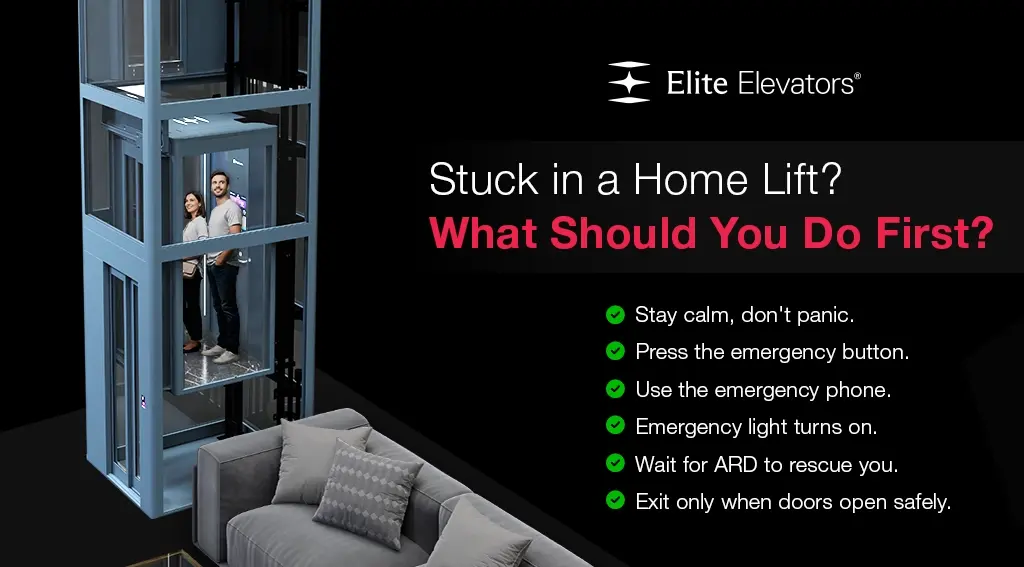
You step into your home elevator, press the floor button, and midway through the journey, it stops. The doors stay closed. Silence. For most people, this triggers immediate panic, and that panic leads to dangerous decisions: forcing the doors, trying to climb out, or jumping to trigger movement.
Table of Contents
In India, home elevator emergencies are more common than they should be, mostly because lifts are installed without proper safety systems or existing safety systems aren’t tested regularly. An uncertified lift without an ARD leaves passengers genuinely trapped. Even in better-quality lifts, passengers who don’t know the emergency procedure make the situation worse.
This guide gives every homeowner a clear, step-by-step emergency protocol and explains the built-in safety features in home elevators that should automatically protect you when things go wrong.
Step-by-Step: What to Do If You’re Stuck in a Home Elevator
Step 1: Stay Calm
The most dangerous thing you can do is panic. A temporary stop in a residential elevator is almost always caused by a power interruption or a safety sensor trigger, not a mechanical catastrophe. Residential home lifts are designed to remain structurally secure even when stationary mid-travel. You are safe inside the cabin.
Step 2: Press the Emergency/Alarm Button
Every compliant home elevator has an emergency alarm button, usually red or marked with a bell icon on the cabin control panel. Press and hold it to activate the alarm, which alerts anyone in the home that assistance is needed.
Step 3: Use the GSM Emergency Phone
All Elite Elevators residential lifts are equipped with a GSM-enabled emergency phone with battery backup that operates independently of the main power supply. Use this to call a family member, the elevator service team, or emergency services. For X300 MK II Plus users, the Live SOS 2.0 system automatically alerts your designated emergency contacts.
Step 4: Turn On the Emergency Light
If the cabin is dark (power failure), activate the emergency light switch. Certified elevators maintain backup lighting. Do not remain in darkness; it increases anxiety and impairs decision-making.
Step 5: Wait for the ARD to Activate
The Automatic Rescue Device (ARD) is the most important safety feature in a power-cut scenario. On battery power, it automatically moves the cabin to the nearest floor and opens the doors within 30 seconds of power failure. Do not attempt to force the doors before the ARD completes its cycle; the cabin may still be between floors.
Step 6: Exit Calmly When Doors Open
Once the ARD brings the cabin to floor level and the doors open, exit the elevator in an orderly manner. Check that the floor threshold is level before stepping out, particularly important for elderly family members. Do not re-enter the elevator until the service team has inspected it.
What NOT to Do in a Home Lift Emergency
- Do NOT force the cabin doors open manually; the cabin may not be at floor level, creating a fall risk of 1–2 meters.
- Do NOT jump repeatedly in the cabin; this can trigger safety brakes unnecessarily and cause jolting
- Do NOT attempt to exit through the roof trap door without professional guidance; trap doors are for trained rescue personnel, not self-evacuation in non-fire scenarios
- Do NOT assume the lift will not start again. Remain in the cabin, especially if you are between floors
- Do NOT ignore the emergency; even if you eventually free yourself, call the service team. A stop mid-travel indicates a fault that requires professional investigation.
How Residential Home Lift Safety Features Prevent Emergencies
Well-designed residential elevators with proper safety systems rarely produce genuine emergencies. Here’s how Elite Elevators’ safety architecture works proactively:
1. Dynamic ENS (Error Notification System):
Real-time fault detection continuously monitors the lift’s performance. If any parameter falls outside safe limits, the system alerts the homeowner and service team before a failure occurs turning a potential breakdown into a scheduled maintenance call.
2. Phase Voltage Protection:
India’s power supply is frequently subject to voltage fluctuations. The X300 Mark II‘s phase voltage protection automatically shuts down the elevator during dangerous over- or under-voltage conditions, preventing motor damage and mid-journey failures.
3. Call Button Jam Detection:
A stuck call button can cause unexpected elevator stops or erratic behavior. The X300 Mark II automatically detects and disables jammed buttons, preventing unnecessary call responses that could otherwise cause confusion or unnecessary stops.
4. No AC Power in Cabin:
The X300 MK II Plus runs on low voltage inside the cabin, eliminating the risk of electrical shock to passengers, an important safety feature for homes with young children or elderly members.
Preventing Lift Breakdowns: Home Elevator Maintenance Best Practices
The best emergency is one that never happens. Home elevator maintenance significantly reduces the risk of unexpected stops:
1. Annual Maintenance Contract (AMC):
Schedule at least one professional service visit per year. Under Elite Elevators’ AMC program, technicians inspect drive systems, safety mechanisms, belt/rope condition, door sensors, GSM function, and battery backup in a single comprehensive visit.
2. Battery Backup Testing:
The ARD battery should be tested every 6 months. A depleted battery means the ARD may not function during a power cut, the exact scenario where you need it most.
3. Keep Emergency Numbers Posted:
Post the elevator service team number inside the cabin. All family members, including domestic staff, should know this number.
Frequently Asked Questions
Q1: What should I do if I’m stuck in a home elevator during a power cut?
Stay calm, press the emergency alarm, use the GSM cabin phone to call for help, turn on the emergency light, and wait for the ARD to automatically bring the cabin to the nearest floor. This process should complete within 30 seconds in a properly functioning lift.
Q2: How long can I be safely stuck in a home elevator?
A properly certified elevator with a functioning ARD should never leave you stuck for more than 30–60 seconds during a power cut. The cabin has adequate ventilation and emergency lighting for extended periods if needed. The cabin is structurally secure and will not fall.
Q3: Can elderly or differently abled people safely use home elevators?
Yes. Residential home elevators are specifically designed for elderly and mobility-impaired users. Features like EGSS technology (no jerks or jolts), low-voltage cabin operation, emergency alarm, and auto-levelling make them far safer than staircases.
Q4: What causes a home elevator to stop suddenly?
The most common causes are power supply interruption (very common in India), overload (exceeding rated capacity), a triggered safety sensor (obstruction in the door or belt misalignment), or a software fault. Most of these are quickly resolved by the ARD or service team.
Q5: How do I know if my home elevator’s emergency systems are working?
The only way to verify is through professional testing during an annual maintenance visit. Ask your engineer to demonstrate the ARD function, test the GSM phone, verify battery backup runtime, and check emergency lighting during the service call.
Note: * Prices listed are starting rates, exclude applicable taxes, and may vary based on customization.



Karthi Vel
One of the best blogs I've read on home lift safety. Everything is explained in a simple step-by-step manner without creating fear. The emergency procedures and lift safety tips shared here are useful for families with children as well as elderly members using residential elevators every day.
Naveen Raj
Thank you for sharing such valuable information. Most people panic when they hear about someone getting stuck in home lift, but this guide explains exactly how to react safely. These elevator safety tips are practical, easy to remember, and useful for every homeowner.
Priyanka Sharma
Very well-written blog with useful safety information. I especially liked the section explaining what should never be done during a lift emergency. Following these lift safety checklist recommendations and scheduling regular home lift inspection can help avoid many unnecessary breakdowns.
Ashok Kumar
This is one of the most useful blogs I've come across on residential elevator safety. The step-by-step guidance for anyone stuck in home lift situations is clear and reassuring. I also liked the emphasis on regular servicing and following a proper lift safety checklist.
Revathi Menon
Great information presented in an easy-to-read format. The blog explains not only emergency actions but also how regular home lift inspection helps prevent unexpected issues. Every homeowner should understand these home lift safety practices before using a residential elevator.
Rajasekar M
This was a helpful and confidence-building article. Knowing the correct response when stuck in home lift situations can prevent panic and unsafe actions. The information about emergency communication systems, ARD, and routine home lift inspection is extremely valuable.